
Khata and Udhar Management: 10 Best Practices for Small Shops
Udhar can support loyal customers, but weak records damage cash flow and relationships. Build a customer-wise ledger that makes every sale, payment and outstanding amount clear.
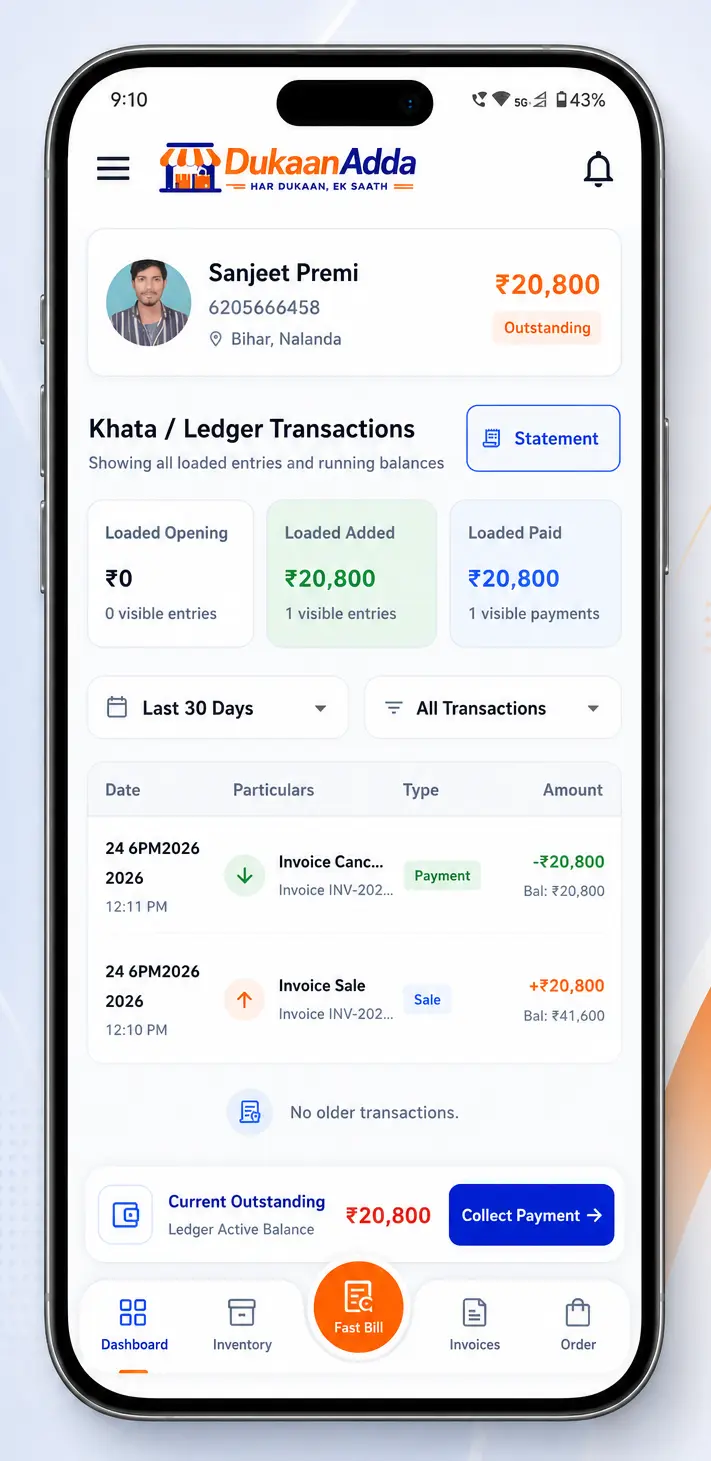
Quick answer
What is the best way to manage Khata and Udhar?
Create one verified account per customer, agree on a credit limit and payment date, attach every Due sale to that account, record payments immediately with the real mode and reference, review receivable and overdue accounts regularly, and share a clear ledger statement when there is any doubt.
Khata is built on trust, but trust works better with accurate records. A paper notebook can be misplaced, handwriting can be misunderstood and one payment may be remembered differently by the customer and shopkeeper. The result is not only delayed money; it can damage a long-standing relationship.
DukaanAdda maintains customer-wise due, overdue, paid and transaction information. It supports Due bills, manual ledger entries, payment modes, running balances, account filters, manual reminder actions and PDF statements. These features become useful when the business follows the same credit process for every customer.
The foundation
What good Khata management actually means
A Khata ledger should answer five questions without guesswork: who took the goods, when the amount was added, how much was paid, which payment mode was used and what balance remains. Each entry needs a customer, date, amount and understandable description.
In DukaanAdda ledger language, a sale or debit entry increases the customer's outstanding amount. A payment or credit entry reduces it. The transaction list shows sale, payment and opening entries with a running balance, while the customer account stores current due and overdue amounts.
Identify
One account for the correct customer.
Record
Every sale and payment entered once.
Reconcile
Running balance checked against reality.
Khata best practice 1
Keep one accurate account per customer
Duplicate customer profiles split one person's sales and payments across multiple balances. Accounts such as “Raju”, “Raju Shop” and “Raju New Number” may belong to the same person, but the operator cannot know during a busy sale.
Search the customer list before creating a new profile. Use the real name, active mobile number and business name where relevant. DukaanAdda also supports email, alternate phone, GSTIN, customer type, address, location, notes and an optional image.
- Use the customer's real name and active mobile number.
- Add business name and GSTIN when relevant for business buyers.
- Store address, city, state and pincode when collection depends on location.
- Set a credit limit as an internal reference, not a substitute for approval.
- Choose agreed payment terms and explain them to the customer.
- Add notes for authorised buyers, collection preferences or special terms.
Phone number is part of collection control
Khata best practice 2
Set credit rules before giving Udhar
Credit should be a business decision, not an automatic response to every request. Decide which customers qualify, the maximum amount the shop is comfortable carrying and when payment is expected. Explain the rule before goods leave the counter.
DukaanAdda customer profiles include a credit-limit field and payment terms such as Due on Receipt and Net 7, 15, 30, 45 or 60 Days. Treat these as stored account information. Do not assume that entering a credit limit alone blocks every future sale or that payment terms automatically send reminders.
| Rule | Purpose | Operator check |
|---|---|---|
| Credit limit | Internal exposure reference | Review current outstanding first |
| Payment terms | Agreed collection timeline | Tell the customer the exact date |
| Authorised buyer | Prevents unapproved credit | Store a useful note and verify identity |
Khata best practice 3
Record the opening balance once and verify it
When moving from a paper Khata to DukaanAdda, the customer may already owe money. Add that verified amount as the opening balance when creating the customer. The app seeds an opening ledger entry so the starting point appears in transaction history.
Do not add the same old dues again as a manual debit. That would double the outstanding balance. Before migration, calculate the paper total, subtract payments already received, confirm any returns or cancelled sales and ideally show the customer the agreed starting figure.
Preserve the migration evidence
Khata best practice 4
Attach every Due bill to the correct customer
A Due bill without a customer is an amount with no collection owner. In DukaanAdda Fast Bill, the Due/Credit mode requires a customer. Select the profile carefully, especially when several people have similar names.
Confirm the customer name and phone before saving. If a family member or employee collects the goods, keep the bill under the agreed account and add suitable information through the available invoice or customer notes workflow. Avoid creating a temporary account merely to finish the sale faster.
Billing and Khata are connected
Khata best practice 5
Record sales and payments when they happen
“I will enter it later” is one of the biggest Khata risks. At closing time, a shopkeeper may remember the amount but forget the customer, or remember the customer but not whether ₹500 was cash received or more goods supplied.
Use the invoice flow for real sales. For a valid ledger-only situation, DukaanAdda also provides a transaction dialog: a payment received is recorded as credit, while an amount or goods added to what the customer owes is recorded as debit. Select the date, mode and customer, then add notes and reference where useful.
Payment / Credit entry
Money received from the customer; outstanding balance goes down.
Sale / Debit entry
Goods or another valid amount added; outstanding balance goes up.
Use a manual debit only when there is a real, documented reason. Normal product sales should still use billing so invoice and stock records remain consistent.
Khata best practice 6
Capture payment mode, reference and notes
The amount alone is not enough for reconciliation. Record whether the customer paid through UPI, Cash, Bank or Card. DukaanAdda's payment workflow stores the selected mode and allows reference notes such as a UPI ID, bank reference or cheque information.
Before recording UPI or bank payment, confirm that money reached the actual account. A screenshot shown by the customer is not the same as a successful credit. For cash, count the money and complete the entry while the customer is present.
Useful reference example
Khata best practice 7
Record the exact payment; surplus becomes advance
Always record the amount actually received. DukaanAdda clears overdue and current due first and stores any surplus separately as customer advance, instead of creating a negative due.
When both overdue and current due exist, the verified balance update applies payment to overdue first and then to current due. The payment amount is also added to Paid This Month for account reporting.
Example
A customer has ₹2,000 overdue and ₹3,000 current due. A verified payment of ₹2,500 clears the ₹2,000 overdue amount first and reduces current due to ₹2,500. Record only the amount actually received.
If a customer pays above the outstanding amount, DukaanAdda clears overdue and current dues first and stores the surplus as customer advance. The same Khata entry shows both portions, and future customer-level charges use the advance automatically.
Khata best practice 8
Follow up consistently and respectfully
Collection works best when the customer knows the due date and receives a clear, factual reminder. Start before the account is very old: confirm the bill, remind near the agreed date and escalate only according to the shop's written policy.
DukaanAdda customer details provide Call, SMS and WhatsApp actions. The WhatsApp action prepares an outstanding-balance reminder that the user chooses to send. This is a manual workflow, not an automatic reminder service.
Call
Use for a direct, polite conversation.
SMS
Use a concise written reminder.
Review the prepared message before sending.
Never share one customer's balance with another person. Confirm identity before discussing transactions, and keep the message professional: name, outstanding amount, relevant period and a request to contact the business if the record differs.
Khata best practice 9
Use dashboard filters to prioritise collection
Calling customers in random order wastes time. The DukaanAdda Khata dashboard shows Total Customers, Total Receivable, Overdue Amount and Paid This Month. Tabs separate All Accounts, Receivable, Overdue and Paid.
Sort accounts by Recently Active, Name, High Dues, High Overdue or High Paid This Month. Start with high overdue where follow-up is needed, then review large current dues approaching their agreed date. Search by customer information instead of scrolling through the full list.
Overdue status still needs a process
Khata best practice 10
Export statements and reconcile before disputes grow
When the customer asks, “How did this balance become ₹8,400?”, answer with dated entries rather than memory. The DukaanAdda ledger screen can filter Last 7 Days, Last 30 Days or All Time, and All Transactions, Sales Only or Payments Only.
Export a PDF statement for the chosen scope. It includes customer details, total added, total paid, current balance and a table of date, particulars, type, amount and running balance. Review it before sharing so the selected period contains the entries needed to explain the account.
At day end, compare recorded Cash, UPI, Bank and Card payments with the actual cash drawer and financial accounts. A ledger can balance internally while the selected payment mode is wrong, so collection reconciliation matters.
Customer deletion safeguard
DukaanAdda workflow
Manage a Khata account step by step
- 1
Create or verify the customer
Confirm name, mobile number and business details.
- 2
Set the account context
Add credit limit, payment terms and opening balance if verified.
- 3
Create the Due sale
Select the customer and Due payment mode in billing.
- 4
Review the ledger
Confirm that the sale and running balance appear correctly.
- 5
Record collection
Choose the customer, amount and real UPI, Cash, Bank or Card mode.
- 6
Add evidence
Use reference notes that make the payment easy to verify.
- 7
Check the new balance
Confirm overdue and due were reduced by the saved payment.
- 8
Export when needed
Filter the right period and download the PDF statement.
Team process
Daily and weekly Khata routine
Every day
- Verify the customer before every Due bill.
- Record payments while the customer is present.
- Check the real UPI or bank receipt.
- Reconcile payment modes at closing.
Every week
- Review high-overdue and high-due accounts.
- Contact customers according to agreed terms.
- Investigate unclear manual debit entries.
- Export statements for disputed balances.
Assign responsibility for collection and ledger corrections. Staff may record a payment, but only an authorised person should resolve disputed balances or add manual debit entries without a bill.
Continuous improvement
Khata metrics worth tracking
| Metric | What it reveals | Useful action |
|---|---|---|
| Total receivable | Money currently tied up in customer credit | Compare with the shop's safe exposure |
| Overdue amount | Balances needing priority follow-up | Contact and agree a resolution date |
| Paid this month | Recorded collection progress | Reconcile with actual receipts |
| Customers with dues | Number of active collection accounts | Assign follow-up ownership |
| Average balance | Whether exposure is concentrated or widespread | Review customer limits |
| Manual debit entries | Sales or adjustments outside normal billing | Investigate repeated reasons |
| Disputed statements | Data or communication problems | Improve notes and confirmations |
Avoid these
Common Khata mistakes
Duplicate customer accounts
One person's balance becomes split and misleading.
Unverified opening balance
Old dues may be doubled or disputed.
Due bill without review
Credit goes to the wrong customer.
Payment entered later
Amount, person or mode may be forgotten.
UPI accepted from a screenshot
A claimed transfer may not have reached the account.
No reference or notes
Payments become difficult to reconcile.
Automatic-reminder assumption
No one actually follows up with the customer.
Deleting to hide a balance
The real receivable remains unresolved.
FAQ
Khata and Udhar questions from shop owners
What is a digital Khata or Udhar ledger?
A digital Khata is a customer-wise record of credit sales, payments and the running outstanding balance. It replaces scattered paper notes with dated entries that can be searched, filtered and reviewed.
How does DukaanAdda record a Due sale?
Choose Due or Credit during the supported billing flow and select the correct customer. The sale becomes part of that customer's outstanding record and ledger history.
Which payment modes can I record in Khata?
The dedicated payment workflow supports UPI, Cash, Bank and Card. A broader ledger-entry dialog uses UPI, Cash, Bank Transfer and Card. Record the mode that actually received the money.
Can a recorded payment exceed the customer's outstanding amount?
Yes. DukaanAdda clears overdue and current due first, then stores the surplus as customer advance for future Khata charges.
Does DukaanAdda automatically send payment reminders?
No automatic reminder schedule is claimed. Customer details provide manual Call, SMS and WhatsApp actions, including a prefilled WhatsApp outstanding-balance message that the user chooses to send.
Does setting payment terms automatically make a balance overdue?
Do not assume so. Payment terms such as Due on Receipt or Net 7/15/30/45/60 Days can be stored on the customer, while overdue amounts and the overdue dashboard view are available separately. Follow the agreed date and verify the account status.
Can I filter a customer's ledger transactions?
Yes. The transaction screen supports Last 7 Days, Last 30 Days or All Time, along with All Transactions, Sales Only and Payments Only.
Can I download a customer Khata statement?
Yes. DukaanAdda can generate a PDF ledger statement with customer details, total added, total paid, current balance and dated transaction rows for the selected statement scope.
Can I delete a customer who still has pending dues?
No. DukaanAdda prevents permanent deletion when due plus overdue is still pending. Clear or correctly resolve the outstanding balance before deleting the customer.
Can Khata entries be added fully offline?
The verified ledger mutation workflows require current saved data and connectivity. Cached information may be visible, but sync before collection work and confirm that a new transaction was saved successfully.
Keep every Udhar entry clear and collectable
Use DukaanAdda for customer credit, billing, payments, PDF statements, inventory, reports and marketplace workflows on Android and Windows.
Download DukaanAdda